
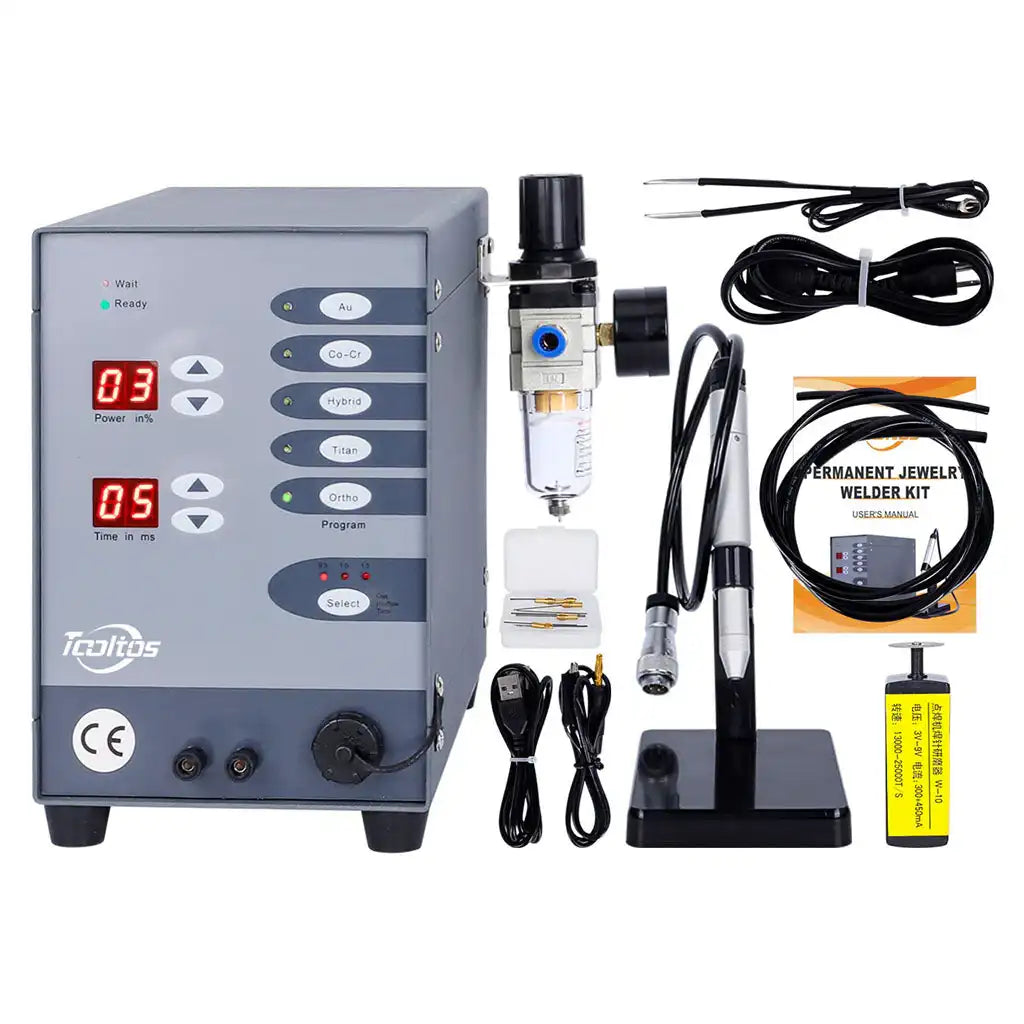
Tooltos Automatic CNC Jewelry Spot Welder: Complete User Guide & Troubleshooting (FAQ)
1. Tooltos Automatic CNC Jewelry Spot Welder Setup & Argon Configuration (Beginner Essentials)
Getting your Tooltos Automatic CNC Jewelry Spot Welder up and running correctly is the first step to avoiding common issues like oxidation or weak welds. Here’s how to set it up like a pro:
Q1: How to connect the air hoses for Tooltos Automatic CNC Jewelry Spot Welder argon setup?
The Tooltos Automatic CNC Jewelry Spot Welder comes with two different-sized air hoses—proper connection ensures no gas leakage and optimal weld quality:
- Inlet (Large Hose): Connect from your argon regulator directly to the filter’s inlet port.
- Outlet (Small Black Hose): Attach from the filter’s outlet to the machine’s front gas port (located next to the welding handle).
Push each hose firmly until you hear a “click” to lock it in place. This step is critical for maintaining consistent argon flow—leaks can lead to black, oxidized welds.
Q2: Do I need argon for Tooltos Automatic CNC Jewelry Spot Welder? How to prevent oxidation in jewelry welding?
While the Tooltos Automatic CNC Jewelry Spot Welder can operate without argon, argon is mandatory for professional, oxidation-free results—especially for permanent jewelry welding or precious metal spot welding.
- Without argon: Molten metal reacts with oxygen instantly, leaving black, rough welds that require heavy polishing or acid cleaning.
- With argon: Argon gas shields the weld pool from oxygen, producing bright, smooth welds ideal for gold, silver, and titanium jewelry.
For best results, use 100% pure argon (not an Argon/CO₂ mix) to avoid contamination.
Q3: What argon pressure setting for Tooltos Automatic CNC Jewelry Spot Welder?
The recommended argon pressure range for the Tooltos Automatic CNC Jewelry Spot Welder is 0.1–0.2 MPa (1–2 bar). This is the sweet spot for most jewelry welding tasks:
- Too low (below 0.1 MPa): Insufficient gas coverage leads to black/yellow weld edges and oxidation.
- Too high (above 0.2 MPa): Gas blows molten metal away, causing pits or uneven welds.
Use the included pressure gauge to monitor and adjust levels—this simple step is key to fixing pitty welds with your Tooltos Automatic CNC Jewelry Spot Welder.
2. Welding Quality Tips: Fix Black Welds, Pits & Weak Bonds
Even with proper setup, you may encounter issues like black welds or metal that won’t fuse. Here’s how to troubleshoot common quality problems with your Tooltos Automatic CNC Jewelry Spot Welder:
Q4: Why are my Tooltos Automatic CNC Jewelry Spot Welder welds black? How to fix black welds?
Black welds are the most common complaint with jewelry spot welders—but they’re easy to fix. If your Tooltos Automatic CNC Jewelry Spot Welder is producing dark welds (even with argon connected), check these three things:
- Argon purity: Use 100% pure argon (avoid mixed gases) for precious metal spot welding.
- Pre-flow timing: Ensure argon flows *before* the arc ignites—this primes the weld area to block oxygen.
- Tungsten needle extension: The tungsten should extend 3–5 mm beyond the ceramic nozzle. If it’s too long, gas can’t fully cover the arc, leading to oxidation.
This fix works for all Tooltos Automatic CNC Jewelry Spot Welder models, including those used for permanent jewelry welding.
Q5: Why does metal “explode” or melt through with Tooltos Automatic CNC Jewelry Spot Welder?
If your Tooltos Automatic CNC Jewelry Spot Welder is melting through thin chains or causing metal to “explode,” you’re using too much energy. This is common for beginners learning how to use the machine for delicate tasks like chain welding.
- Causes: Power setting too high, welding time too long, or using the wrong parameters for thin metal.
- Fix: Follow the “low power + short time” rule for delicate work. For thin chains or small prongs, use 2–4 power and 4–6 ms time. Weld in multiple low-power pulses instead of one strong burst—this prevents melting while ensuring a strong bond.
Q6: How to get strong welds with Tooltos Automatic CNC Jewelry Spot Welder? Why won’t metal fuse?
Weak or incomplete welds often stem from poor preparation or incorrect technique. Here’s how to fix it:
- Clean the metal: Oils, fingerprints, or oxidation on the workpiece block conduction. Wipe with alcohol or polish lightly before welding.
- Target the joint: The tungsten needle must touch the exact spot where the two metals meet—off-center contact leads to weak bonds.
- Adjust power for silver: Silver dissipates heat quickly, so use a higher power setting (4–6) than you would for gold when using your Tooltos Automatic CNC Jewelry Spot Welder.
3. Tooltos Automatic CNC Jewelry Spot Welder Troubleshooting: No Spark, Sticking Needles & More
Even the most reliable automatic CNC jewelry welder can run into issues. Here’s how to solve the most common Tooltos Automatic CNC Jewelry Spot Welder problems:
Q7: Tooltos Automatic CNC Jewelry Spot Welder not sparking—what’s the solution?
If pressing the pedal produces no spark, the circuit isn’t closed (the #1 issue for beginners). Follow this checklist for the Tooltos Automatic CNC Jewelry Spot Welder:
- Ensure the machine displays “Ready” (not “Wait” or “Charging”).
- The black ground clamp must be securely attached to the workpiece or the tweezers holding it—loose clamps break the current loop.
- Touch the tungsten needle to the metal *before* stepping on the pedal.
Q8: How to fix tungsten needle sticking to jewelry with Tooltos Automatic CNC Jewelry Spot Welder?
Tungsten needle sticking (also called “welding stick”) is frustrating but preventable with proper maintenance:
- Sharpen the needle: Dull or contaminated tungsten sticks to molten metal. Use the included USB grinder to sharpen it to a pencil point.
- Lighten pressure: Touch the needle gently to the workpiece—don’t press down hard.
- Reduce time: Shorten the welding time by 1–2 ms to avoid overheating the needle.
Stock up on replacement tungsten needles for your Tooltos Automatic CNC Jewelry Spot Welder to avoid delays mid-project.
Q9: Is it normal to feel a tingling sensation when using the Tooltos Automatic CNC Jewelry Spot Welder?
The Tooltos Automatic CNC Jewelry Spot Welder uses high-voltage micro-pulses, so a mild tingle is common if you hold metal directly—especially with sweaty hands. This isn’t a machine fault, but it’s easy to fix:
- Use the included welding tweezers or insulated pliers to hold workpieces.
- Wear insulated finger cots for extra protection during delicate tasks like prong repair.
4. Tooltos Automatic CNC Jewelry Spot Welder Parameter Settings (Professional Tuning)
The Tooltos Automatic CNC Jewelry Spot Welder features 5 preset modes (Au, Co-Cr, Hybrid, Ti, Ortho) for quick setup, but customizing parameters is key to mastering different materials and thicknesses.
Q10: How do Power and Time work on Tooltos Automatic CNC Jewelry Spot Welder?
Understanding these two settings will transform your weld quality:
- Power (02–10): Controls current intensity and weld depth. Use lower power (2–4) for thin metals (0.3–0.5 mm) and higher power (5–7) for thick rings or stainless steel.
- Time (4–30 ms): Regulates heat duration and weld size. Short times (4–6 ms) are ideal for delicate work; longer times (7–10 ms) work for cobalt-chromium alloy welding or mold repair.
Q11: Are the Au/Ag/Ti presets on Tooltos Automatic CNC Jewelry Spot Welder automatic?
No—these are starting points, not one-size-fits-all settings. Every material (gold vs. silver vs. titanium) and thickness requires adjustment. For example:
- 18K Gold (0.3 mm): Use Au mode + Power 2 + Time 5 ms.
- Pure Silver (0.5 mm): Use Ag mode (Hybrid preset) + Power 3 + Time 6 ms.
- Titanium (0.8 mm): Use Ti mode + Power 5 + Time 7 ms.
Always test parameters on scrap metal before welding your final piece.
Q12: Beginner-friendly universal settings for Tooltos Automatic CNC Jewelry Spot Welder?
If you’re new to jewelry welding, start with these fail-safe settings for the Tooltos Automatic CNC Jewelry Spot Welder:
- Power: 02–04
- Time: 04–06 ms
- Argon Pressure: 0.15 MPa
Test on scrap metal, then increase power incrementally until the weld is strong but not overdone. This is the best way to learn how to use the Tooltos Automatic CNC Jewelry Spot Welder without ruining projects.
5. Tungsten Needle Maintenance & Tooltos Welder Care
Proper maintenance extends the life of your Tooltos Automatic CNC Jewelry Spot Welder and ensures consistent results. Here’s how to keep it in top shape:
Q13: Can I use sewing needles instead of tungsten for Tooltos Automatic CNC Jewelry Spot Welder?
Absolutely not. The Tooltos Automatic CNC Jewelry Spot Welder requires 1.0 mm or 1.5 mm tungsten electrodes (included in the kit). Tungsten’s high melting point resists damage from the arc—sewing needles will melt instantly, ruining your weld and potentially damaging the machine.
Stock up on replacement tungsten needles for your Tooltos Automatic CNC Jewelry Spot Welder to avoid project delays.
Q14: When to sharpen tungsten needle for Tooltos Automatic CNC Jewelry Spot Welder?
Sharpen your tungsten needle whenever:
- The tip turns black or has metal residue buildup.
- The tip becomes rounded (causes unstable arcs).
- The arc “dances” instead of focusing on the weld joint.
Use the included USB grinder to sharpen it to a 30–45° pencil point—this ensures precise, concentrated arcs for small jewelry parts.
Q15: How to handle Tooltos Automatic CNC Jewelry Spot Welder overheating?
During long welding sessions, the Tooltos Automatic CNC Jewelry Spot Welder may activate overheat protection. To fix this:
- Keep the machine powered on but idle for 10–15 minutes (fans will cool it down).
- Avoid continuous welding for more than 5 minutes at a time—take short breaks to prevent overheating.
- Ensure the machine is placed in a well-ventilated area (no enclosed cabinets).
Mastering the Tooltos Automatic CNC Jewelry Spot Welder: Final Tips
The Tooltos Automatic CNC Jewelry Spot Welder is one of the most versatile tools for permanent jewelry welding, ring resizing, chain repair, and precious metal work. Remember these key takeaways:
- Black welds → Check argon flow, purity, or tungsten extension.
- No spark → Verify the ground clamp and “Ready” status.
- Sticking needle → Sharpen it and reduce welding time.
- Weak welds → Clean the metal, target the joint, and adjust power.
With the right setup, parameters, and maintenance, the Tooltos Automatic CNC Jewelry Spot Welder will become your go-to tool for professional, stone-safe welds. Whether you’re a beginner learning how to use a jewelry welder or a pro troubleshooting issues, this guide covers everything you need to succeed.
Ready to take your jewelry welding to the next level? Grab your Tooltos Automatic CNC Jewelry Spot Welder and start practicing—mastery comes with consistent use!
0 comments